Thursday, May 27, 2010

Project 2 Update

I haven't posted in forever so here is an update of various things 3D

For the building projection project 2, I'm looking into a program called VVVV It's windows only but it looks like it was important in most of the 3d building projection videos you see on you tube. It uses 'nodal' programing like Max or PD or Isadora and it can deal with 3D meshes effects/texturing/whatever in real time

This page describes the process of creating building projections.

It's getting a little late to take on any new technology so I'll have to see if this software is friendly enough to use before I commit to it for my project. In any case, the first step appears to be creating a 3D model of the surface being projected on. So I corrected my cell phone pic (pillow/pincusion distortion and source angle) of Villard to be more accurate and I am now starting to create that in blender. Feel free to use this, I have no idea if it's any better /worse than the official pic but I wanted to try it.
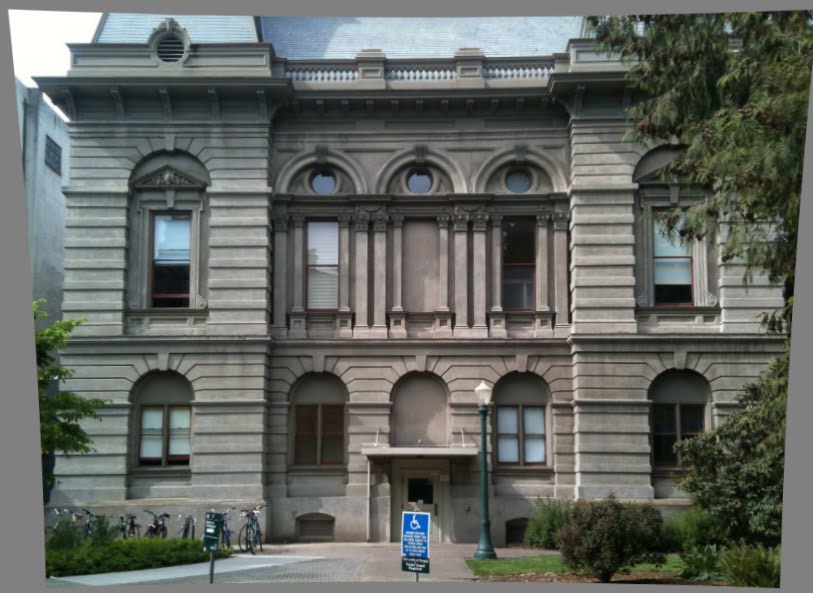
So now it's off to Blender to create the 3D version of this. Unless anyone has already done this? Anyone? Anyone? I'd be willing to trade collaborate something programming or engineerings wise? Yes, I'm lazy, I wish I had the attention span for extremely detailed modeling, I envy people who do. Instead, I get distracted trying to figure out other ways to do stuff like this like.........

Check out this way of automatically created 3D structure from real objects

extremely cool interactive point cloud thing
http://www.openprocessing.org/visuals/?visualID=1995

how to:
http://www.instructables.com/id/Structured-Light-3D-Scanning/

http://createdigitalmotion.com/2009/02/simple-diy-3d-scanning-projector-camera-processing/

http://www.openprocessing.org/visuals/?visualID=1014

master site: bit terse itself but links everywhere else
http://sites.google.com/site/structuredlight/implementations

Wednesday, May 5, 2010

Transform Sequence take 2

This isn't hopefully not my final project One but it's my emergency backup in case my tech problems keep persisting. But, this is in pretty pretty HD so be sure to see it full screen.

Xform from Clay Kent on Vimeo.


My original idea used match moving and mixing in real video quite a bit which technology wise isn't working out so great yet. I've tried Icarus on mac and PC, voodoo on PC, every setting imaginable and soooooooooooo much time but both those programs eventually just crash with no results when there's anything longer than 10 seconds. I'm going to reshoot my video this weekend with no camera movements and without match moving so at least I can turn something in that resembles my original idea. Perhaps use fake camera shaking in after effects or something to simulate it. Anyways, enjoy the work in progress...

Thursday, April 29, 2010

Text Render

Blender text render test from Clay Kent on Vimeo.


This will eventually go into my old project when I get around to rerendering it.

24p fix

For my project I am using live action with blender stuff composted in. I have a Cannon Vixia HV30 High def camcorder that takes great 1080 resolution video. It even does 24p - the option is somewhat buried, but it's in there. Problem is getting 24 p out of a camcorder into anything is a serious PITA. You'd think it would be automatic but not yet. The 24p comes coded out as 60i. Pulldowns and reverse telecine are big long blog entries in their own right (which aren't needed at all in HD digital video but for some reason they are still there) so I won't go into it other than saying that's the stuff you have to undo to get your 24p back. So if you want to get at your 24p video (like to match my blender renders) you need to decode it somehow. After much research I came across a couple ways to do it in compresor and cinema tools, (I think after effects can do it too) but then found much much easier way. Get yourself this freeware program called JES Deinterlacer


---------GET THIS------ http://www.xs4all.nl/~jeschot/home.html ---------GET THIS------


Launch it up, load your movie, select the project box, select reverse telecine and let it do it's thing. And voila, 24p restored. No more weird jaggies and hard to track video.

One more note, In yet another hold over from analog video, quicktime's default display for 1080 lines of resolution is actually 1062 to hide possible analog edge broadcast distortions. (Has 1080 video ever been broadcast in analog? Who made this nonsense a standard?) You don't need it and can get your 1080 back fairly easily. To get rid of this, open the clip in quicktime, cmd-J for the movie property windows thing (or from the windows menu), goto to aperture conform and select 'production' instead of 'clean' and instantly your 1080 lines come back. Save your changed movie and your all done. Then, take it into FCP or wherever and enjoy 24p. Better directions and more info here

You may also have noticed that instead of 1920 columns you have 1440 or something. That is becuase the HDV codec used in the camera uses non-square pixels which when rendered out come out to 1920. Nothing you can do about that. So no true HD yet. (ughhhh I want a red so bad)

Some better written info on all of this here:
http://eugenia.gnomefiles.org/2007/07/13/canon-hv20-24p-pulldown/

Wednesday, April 28, 2010

Project One progress

Very rough transformer sequence. Rendered on a netbook and assembled with windows movie maker......


(sorry for non vimeo video but Its late and I want some sleep and vimeo wont start converting for another half hour and the source quality isn't that great anyway and its a full moon ......)


Monday, April 26, 2010

Project 1 progress: slight hitch


So I was making good progress in Blender when my laptop decided to brick itself. Soooooooooo didn't really get as much done as I would have liked. (although I learned how to take apart a macbook pro) I have access to spare machines but nothing powerful and reliable at the same time. I was able to finish up most non computer stuff like shooting video (thank you nice weather) and recording audio but it looks like I'll be putting in a lot of time in the labs this week.

Lessons learned - next time buy apple care. Always have a spare everything - launching your mac while holding down the T button starts it up as a firewire drive to save your files to another computer (thank god)

Tuesday, April 20, 2010

Project One update

So here's a very rough update on project one so far. It won't make much if any sense yet but here it is:

The concept is 2 transformers (like the toy and the recent movies) meet up and have a short conversation. This piece will mix live action and 3D rendered animation. The render shot sequence (almost a story board except it doesn't make much sense on it's own) is sketched out (see pics below) and the script is ready. I'm recording the dialogue tonight or tomorrow and will record the live action video segments this weekend hopefully. That leaves next week to get a rough render for timing ready and the beginning of the week after that to start the 'real' render. All the while, I'll be working on the real models in Blender which I'll drop in and replace the placeholders in the timing mockup for the final product.


oh yeah - high quality art - I know you're jealous